

Webinar Recording: AI in Field Service, From Reactive to Predictive Performance


Introduction & Welcome
Welcome everyone. Great to have you with us today. Over the next 30 to 40 minutes, we're excited to show you exactly how AI and other tech is changing field service management right now, not just in theory, but in practice. We'll share some real stats, real practical examples, and a clear picture of what's possible for your business.
Quick introduction, I'm Stephen Lindsay. I've been working in the industrial sector for longer than I care to remember. Since the 1990s, I'm accompanied by David Simpson, who's been industry a similar timeframe and is gonna be taking you through a few snapshots of the software later in the session. But let's get kicked off. So we are all using AI both in our business and personal lives.
And it's clear that those companies that adapt and utilize AI and other tech will have an advantage over those that don't. Alongside AI technologies and tools for monitoring plants and equipment using sensors, IOT, telematics that actually predict failures before they happen have been around for a long time now. We have a global customer that's been using condition-based monitoring and SCADA systems to trigger service and repair events for over 10 years now. However, what has changed is the cost of implementation is especially for remote equipment in the field has become more accessible, especially for the big market. So what does a typical repair process look like today?
The Reality of Reactive Field Service Today
So we see a lot of field service businesses that are still running on reactive models, either waiting for things to break, manually scheduling engineers, chasing paperwork. So more often than not, the process starts with a piece of equipment failing, stopping operations, needing human intervention to pick up the phone or send an email to the service company to get help.
So, hopefully you can see this is typical and resonates with you guys, but there are often multiple emails, phone calls, software systems, spreadsheets, even Google Maps used throughout a typical process today. So often the engineers are arriving at site with no real clue about what's is wrong with the equipment. So he's on the back foot with a customer already. It might need a part to fix that they don't have on their van. So they need to book another visit resulting in more down time for the customer and more cost for the service business. So what does that mean?
The Business Impact of Reactive Maintenance
So it has typically has an impact in a number of ways. So operationally, we often get directs of companies frustrated that they have engineers waving each other as they pass one another on the motorway, reflecting that there is a more efficient way, to travel and less mileage is needed. When the engineer arrives, they can take longer than is actually really required to diagnose a problem compared to having the information that they may have access to via telematics. And from a customer point of view, their unhappy equipment isn't available, they're unsure when it can be back up and running again.
And financially, ultimately this might result in missing SLAs, penalties, costly double visits, and ultimately may even result in losing customers.
The Shift from Reactive to Predictive Maintenance
So as I mentioned previously, predictive maintenance is nothing new, but the tools and systems that are now available to move your business from reactive and preventative to more predictive approach and more accessible than ever. Once it was only possibly that larger enterprises that could afford the tech, but that has definitely changed.
If we're all really honest, most service businesses sit somewhere between reactive and preventative today. So the shift to predictive is where the real gains are. And it's really the maturity of AI that makes that possible. And some of the numbers are really interesting in that and add up. So predictive maintenance typically reduces unplanned downtime by up to 50%, and interestingly also can extend asset life by 25 % as well. So how many of you are still waiting for something to break before you act?
The AI Maturity Journey
So if we widen our view, we often find reflecting on where you are today from an AI maturity perspective is really helpful. So here's what we believe AI maturity journey looks like for most field service organizations. So where do you guys think you might sit today? Most businesses we speak to are between stage two and stage three.
However, the gap to stage four is a lot smaller than you think. And when we get to stage five, it's even more exciting where AI can be used to optimize and orchestrate processes to improve service levels, improve first time fixed rates, improve efficiency and productivity.
What an AI-Enabled Service Process Looks Like
So let's have a look what an AI or tech enabled process can look like today. Just imagine if your customer's machines alerted you to a problem likely to occur before it happens, before your customer is even aware of it.
It automatically alerts you and creates a job to prevent the real breakdown, allowing you to arrange planned maintenance with your customer so they can avoid any costly downtime. AAI scheduling is used to make sure the right person is at the right place at the right time with the right skills and information and parts to fix the issue first time.
The engineers got tools and systems so they can focus on fixing stuff rather than completing paperwork. The customer is updated at every step by text message, avoiding any awkward phone calls to you in the office. And AI can be used retrospectively to advise on future maintenance approaches to avoid the same issue or call out happening again. So.
I'm going hand across to David now to show you how little snapshots of these technology and features and see it in action ⁓ and how these can help you progress from a reactive mode to a more proactive and predictive ⁓ operations. So hand over to you, David.
Demo: QR Code Job Logging
Let's start with remote logging a job. QR codes can be printed off through this system and stuck to your customers' assets, and they can serve two purposes. They can enable engineers to drive data from the assets on customer sites, and they can also serve as a way for customers to quickly and easily log jobs. You can see a QR code on screen. You can ask for a volunteer to follow the instructions to raise a job after following the link from the QR code. You see...
A customer would usually need to pick up the phone to tell me who they are, tell me the asset information, they might need a serial number, et cetera, and also they need to tell me what's wrong with it. And on our side, I'd need to search for the customer record, the asset type, type of the work required and raise the job. With QR scanning, all of that goes away. So just to show you what that would look like.
You can see, it's landed on the equipment record within Service Geeni and it's got an option to raise a job below that. If I click into that, it gives the user the ability to log the fault against that piece of equipment for me, which I'm hoping that somebody's already done. So I'll just refresh this.
Great, so I've got a couple of jobs here. I'll choose this one. Thank you for whoever did this for me. So the job has now landed in our system without either me or the customer having to do very much work at all. The customer's happy because they logged the job quickly without being asked to go and search their assets, serial numbers, et cetera. And I'm happy because I'm not on the phone waiting for them to do all of that. As well as logging the job, the system can also notify the customer via SMS text that we've received their job.
Demo: Service Geeni AI Agent
Now can see the nature of that job, who it's for, and it's for asset number 846063. I might want to know more about the history of the asset on that job. And for this, we can use Service Geeni AI, an AI module within Service Geeni that allows us to gain insights into our system data just by asking it questions. There's no need to write a full report.
I could just use natural language to ask what I wanted to want to know and it will tell me. In this case, I've asked it to show me the work done notes for the past six weeks on equipment number 846063.
Sometimes with a lot of data, it's useful to be able to maximise the screen here.
Now, this information is useful to me because it's done exactly what I asked it for. It's giving me the work done notes for that piece of equipment for the time period that I asked. And the three jobs that are up here, all of them are quite recent. And I can see exactly what the engineer did on each job. I'm going to go into one of these jobs to see a little bit more information about it so that I can see, for instance, parts used, any photographs, et cetera.
So it's gone into the job for me. It lands in the financials page, which might be useful information, but more likely I'd be looking for the work done. In this case, I'm looking to see what the engineer did plus any photographs. And I also want to see things like parts used, perhaps any forms that were done. Did a quote come off the back of it and any documents that were created, including job sheets or any inspections that were done on that job at that time. So maybe that gives me some indication of what's wrong with the equipment this time.
And who I need to send, in this case, the engineer that I'm going to send is David.
And upon scheduling this job, the customer can receive SMS notification to tell them that the job is scheduled and when to expect us. However, rather than scheduling this job manually, this can be done automatically using our AI route planning tool.
Demo: AI Route Optimisation & Scheduling
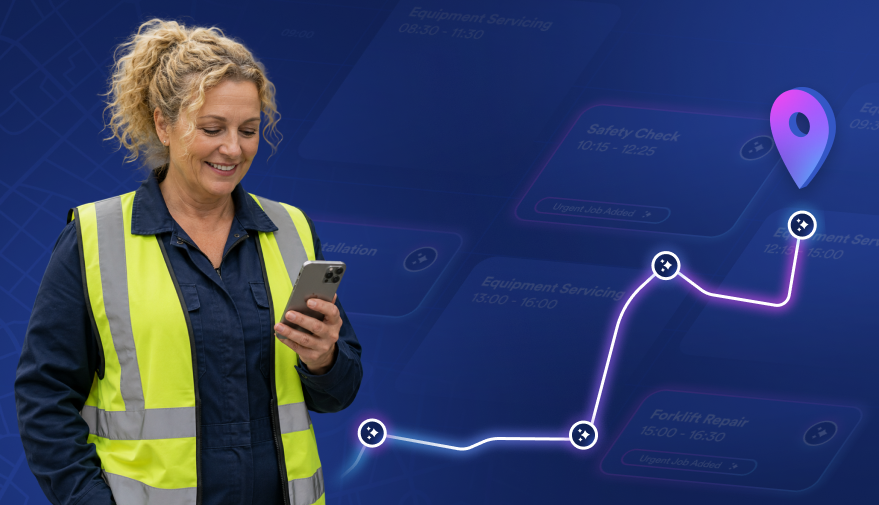
So route optimisation in Service Geeni leverages AI to optimally schedule engineers jobs in the most efficient route to reduce travel time between jobs in order to increase working time, prioritising SLAs and accounting for engineer skill sets and working time. It can select the correct engineer for the correct job at the correct time. And we understand that situations can change in a busy working day. So the system will adapt as your situation changes, scheduling new jobs and reprioritising as necessary.
To show you how this works, I'll need some jobs to be in disarray. So here's a schedule that I messed up a bit earlier. So on this page, we can see already there's a notification at top right saying that the jobs for tomorrow have been optimised resulting in around a 50 % reduction in costs. Before we go into that, I'd just like to show what those jobs look like in the schedule currently tomorrow.
So we can see that there are three engineers and of those three engineers, there are nine jobs. We've got four jobs each for these two engineers and we've got one job for this engineer. It's also worth pointing out that these three jobs at the end here are all for the same site. They may be for different equipment and different reasons for going, but there are over three different engineers, which is obviously a problem and not very efficient. But let's see how optimisation handles that for us.
So in the optimisation screen, we can see already that the optimiser has suggested two engineers instead of three. So it's condensed three engineers into two engineers, three engineers jobs into two engineer schedules. At the top, it tells us overall mileage saved and time saved. And if we go into Raymond's schedule or Raymond's route, we can see his original schedule versus the optimised suggestion down here.
At the top we can see pre and post, mileage and travel time. So quite a significant reduction in mileage and travel time there. And down in the list, we can also see that from having been issued four jobs originally, he now has five. But even so, his overall estimated working time is lower. On the map, we can see his original route was from Stoke, then Nottingham, and then back on himself, which again is not very efficient.
But in the optimised version, it's localised around the Stoke-on-Trent area. And if we pan out there, it will give you more of an idea of how condensed those jobs are. If we look at James's schedule, the other engineer that will complete the picture.
And we can see a similar story. This engineer has got four jobs. Originally, they were spread out quite far away from each other. But in the optimised version, they're all localised within the East Midlands area. Third engineer would have had their schedule cleared and AI would now look to draw down from the unissued jobs list to fill his diary with geographically more relevant jobs to him. So what the system has done is to reduce travel time in order to increase the working time, which will hopefully create capacity to undertake more and extra jobs in each day per engineer. So let's go back to the scheduler.
And let's have a look at the mobile device while I change hats to become an engineer.
Demo: Mobile Engineer App
So we can see the job that was logged via the QR code is here. I can see who it's for. I can see on what equipment. And I can see the nature of the job. I can navigate to the site by selecting this button. And if I click into the job, I can start travel, which will notify the customer again via SMS that I'm on my way to them. At this stage, mandatory van checks and risk assessments can be set up for engineers to be required to fill in.
I can see all info regarding the customer, the nature of the work to be done, and equipment information.
I can see a history of work done to this asset in order to give me better insights into how to correctly diagnose the problem and repair on this job.
I can see the full engineer's full work report, what the reason for the call was, the date of completion, and very usefully I can open up any certifications or inspections that were part of that job originally that the engineer filled in.
If I punch into that, you can see more information about it. On the Forms tab, there may be forms that I need to complete. They would appear automatically depending upon the type of asset that the job has been logged against. This is reactive job. It's more likely that these forms would exist for a PPM job.
Under work done, I can flag things like customer damage, which would flag up in the back office, maybe to allow the back office staff to change the chargeability against that job, especially if it's under warranty. I can book parts and I can request parts from here. Labour is occurring itself. There's not much I really need to do there.
I can write my work report using the onscreen keyboard, of course, or by speech to text, or I might use phrase book items. This helps me to compile large amounts of text really quickly and easily, and it omits spelling errors, and it makes engineers really quite happy. Because no engineer likes writing work reports. I can also from here take a photograph.
And the good thing about photographs on here is that I can annotate them to draw attention to whatever I deem the problem to be. I can create a quote request from up here if necessary, when signing off the job the customer gets a full view of everything that's been done, and is asked to sign it.
And is presented with a customer satisfaction survey so they can choose their satisfaction level. Poor satisfaction can be notified back to the main office immediately. This can also be used to report on the overall customer happiness levels.
Once the engineer has countersigned it, the job is completed and it would undergo a status change in the back office to show that that work is now done.
All relevant documentation can be compiled automatically and sent after it's been authorised by the back office staff.
Show that it was there, now green.
And just to round off this session, I'd like to show you a little bit more around Geeni AI So let's ask a couple more questions.
In this case, I'm asking it to show me the percentage of missed SLAs over the last three months. And it brings that information up immediately for me. So 100 tasks in total, missed SLA tasks is 60. That puts our SLA percentage missed at 59.4. It can show me the tasks that missed SLAs. And as you can see, it will make suggestions based on the subject of the questions already asked.
We can also ask around subjects like first time fixed rates, equipment reliability, utilisation, and so on. And it will soon extend into all areas of system so that you can ask questions around stock management and finance, including invoicing and so on. So this is showing me tasks that missed their SLAs. me all, I'm gonna go and ask it to show me all completed tasks in the last three months.
And useful information can be asked, such as which customers had the highest number of missed SLAs.
So it's telling me that it's only showing the first 10 here, and it's cut it off there in order for gravity purposes. And it's asking me if I need to ask it to show me the whole picture. And I could say yes to that question. It show me everything. OK, so that concludes our overview of Service Geeni utilising AI to improve processes and manage business data. Thank you for your time today.
Thank you, David. We've got a few presentation slides just as a review and as a summary. So bear with me and I'll share my screen again. So, there we go.
Key Metrics & Business Benefits
So hopefully you guys can see that in the background. So just as a recap, so often we've spoke about predictive mode of maintenance and using telematics and IoT to connect to plants and equipment in the field. But if your plant and equipment doesn't have that technology available, David showed a very nice feature to make it nice and easy for customers to highlight that there is a ⁓ repair and issue in the field without having to pick up ⁓ the phone or send you an email. So that QR code job logging offers efficiencies for your customer in being able to highlight there's an issue with their equipment and it also provides efficiencies in your operational teams without having to transcribe jobs using from the phone or from the email into a field based systems. So it's a real slick way of connecting with your customers and understanding when there's faults in the field.
David also showed us on a really exciting ⁓ piece of technology around AI ⁓ route optimization and optimized scheduling. ⁓ And this is something that obviously reduces or make sure you've got the right place at the right place at the right time. But what we've typically found with customers that have adopted this technology is that it not only reduces the time traveling and obviously cost of that travel, but it also allows businesses to satisfy ⁓ more demand with less resource. So it actually increases the capacity of their engineering team. So we all know that it's difficult getting good engineers. So anything that you can do to make sure that they're efficient and as productive and utilized as possible, rather than spending time on the motorways, that's really important.
The metrics are really exciting around typically around 55 % reduction in mileage. Engineers being able to complete an extra job a day and also providing effectively extra 25 % capacity with the same number of engineers. So it's something that's available today. Has a very quick return on investment typically between three and six months. So it's a really exciting technology. David kindly also showed us the mobile application. So we talked at the beginning of the session, around the engineer going to site with as much information as possible to allow them to fix fit parts that are relevant and get that plant up and running as quickly as possible. So David showed us some features around giving visibility of the history for the engineers so they can go to site understanding what parts might be needed, what's been done there previously and also, engineers like fixing stuff. They don't like doing paperwork. So there was a couple of features around text to speech to text and pre configured ⁓ paragraphs that they can add to the job at the touch of a button rather than having to write out paragraphs. So all through this process, and David didn't demonstrate this, but keeping the customer updated about actually what's going on through the process is really important. People are now used to Amazon giving them notifications and when a drive is going to arrive and the same applies now, the same expectations come of service business
So there's a raft of customer notifications to let the customer know when a job's being created, when an engineer is on the way, when they've arrived, when they've completed, so that they're not phoning up the office, wasting their time and your time as well. And the bit that I'm really excited about is the Genie AI feature. So David demonstrated that at a couple of...
Couple of parts of the process. So, ⁓ one, once a call's being logged, ideally by IOT or by the QR code scanning, the, whoever's triaging the call, ⁓ could ask the system a question and get some really valuable insights into what might be wrong with that asset. What's happened in the future? What parts might it might be required and being able to maybe even solve the problem over the phone, but if not, issue that information to the engineer so they're going to site and see your customers fully armed with that information. Secondly, the bit that's also really exciting is through Service Genie and Field Service Systems, you're capturing a lot of interesting valuable data, from especially from the engineers in the field. So the ability to interrogate that data without having to build a report through natural language in real time is really powerful. So A to make informed decisions quickly to improve the service delivery for your customers, but also being able to react to questions and demonstrate your capability and service levels with customers as well. So thank you for that David, really interesting stuff. So what do all these features actually mean for your business?
So typically service managers and operations now have the tools to ensure they can deliver the best possible customer experience while still reducing cost and maximizing the productivity of their available engineering resource. Engineers spend less time on the M1 and the M6 and more time fixing stuff which is something that they typically prefer doing rather than sat in their vans ⁓ and you get happy customers when their plant and equipment is available, productive and making them money. So some takeaways here.
The AI Maturity Checklist — Where Are You Today?
Before I wrap up, here's a quick checklist to analyse where you are on the AI tech maturity scale and be honest with yourself. So ask some of these questions. Do you know where every engineer is in real time? Are your assets fitted with condition based monitoring sensors? Is your condition data providing value feeding into your service platform automatically? Can you see asset health scores across your equipment portfolio and fleet? Are you using AI to optimize your engineer schedules? Or are you relying on maps and your planners knowledge?
Do you get automated alerts when assets deviate from their ⁓ normal operations? Can you see which assets are most likely to fail in the next month before they fail? And do you know the cost per job by asset type? So typically, you've answered no to more than two of these, you're probably leaving some element, some profit margin on the table.
Key Takeaways
Just to wrap up and a few takeaways that I'd really like you to leave the session understanding is reactive maintenance is a choice now and it's costing you more than you probably realized not acting on it.
Your asset data is already telling you something, but most businesses just aren't listening. Condition-based monitoring or IoT sensors is the foundation to predictive maintenance. Otherwise, it's just guesswork. And AI scheduling isn't futuristic, it's available now, typically delivers return on investments within months and frees up valuable resource. A couple of other points before I finish, the journey to predictive doesn't require a big bang approach. It can start with small steps and build from there. So in summary, businesses that are pulling ahead aren't bigger. They tend to just have better operational intelligence. So thank you for watching this afternoon or this morning or this evening if you're online. Please don't hesitate to reach out to myself and David at servicegeeni.com if you've got any questions.
I'll just hang on to the session for the next few minutes. anybody wants to ask any questions, then please post in the public chats and I'll do it and I'll answer those. Thanks for your time.
Q&A — Can You Ask the AI Agent Anything?
I just see the question pop up in the chat there. Can you ask the AI agent anything? Is it free text? Yes, it's very like the large language models that you're probably used to, like the chat GPTs of the world. It's focused and only interrogates the data within Service Genie, so it's not looking at the web but it works on free text, so natural language. So if there's something that you want to know quickly and you've not got time to refer to a portal or build one, then ask the system questions and it can give you answers. And it typically ends up as a natural conversation with the system to get real insight and under the hood of what's happening, what's going wrong and help you make decisions quickly.
Really good question that. Thank you.
Okay guys, I hope that's been of value. Please again, please don't hesitate to reach out to us at servicegeeni.com. Have a good day. Cheers.
Download Full PDF
Read More…

Book Your Demo Today