
New in Service Geeni: SMS Notifications That Keep Customers in the Loop


Why we built it
Service Geeni built SMS Notifications to help service teams keep customers informed without adding more manual communication work.
For the full feature overview, configuration details, and current capability list, learn more about SMS Notifications.
As service businesses grow, communication gets harder to scale.
More jobs usually means more moving parts. More moving parts usually means more customer questions. And too often, those questions land in the same place: your service desk.
The problem is not that customers want updates. That part is fair enough. The problem is how those updates get delivered when the process depends on manual calls, reactive emails, or engineers using their own phones to keep people posted.
That approach might work for a while. Then the cracks start to show.
Calls interrupt scheduling. Engineers get pulled away from the day’s jobs. Customers still feel unsure because updates arrive late or inconsistently. Before long, your team is spending valuable time repeating the same information instead of managing the work itself.
SMS Notifications are built to take that pressure off.
Rather than treating customer updates as a separate task, Service Geeni brings them into the operational workflow. Your team chooses which customers, sites, contacts, and job milestones should trigger a message. When those events happen, the SMS goes out automatically. That gives you a more proactive service experience without bolting on more admin.
What the feature does
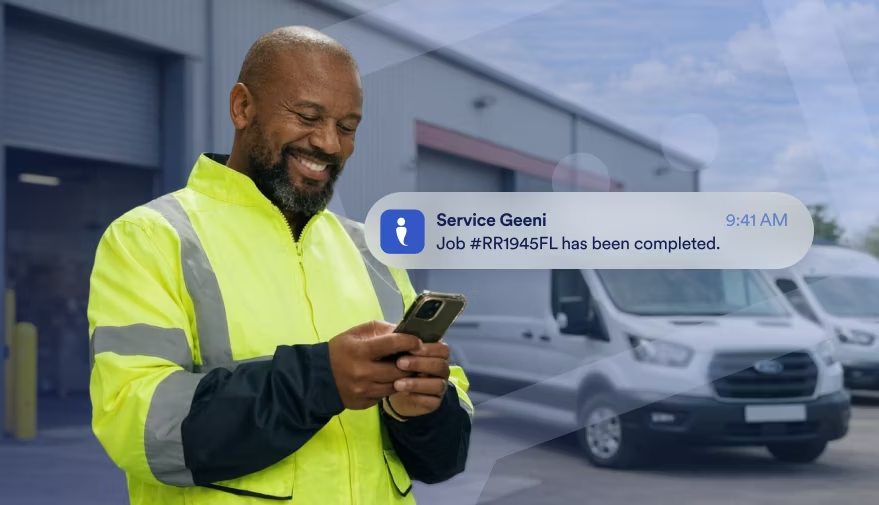
SMS Notifications automatically send text updates to selected customer contacts when key job milestones happen in Service Geeni.
In practice, that gives your team control over who receives updates and when.
You can choose which customers or sites should receive notifications, which contacts should get them, and which job milestones should trigger a text.
The currently available triggers include:
- job logged
- job scheduled
- engineer en route
- engineer arrived
- job completed
Messages include the job reference and a status update. Communication history also records when SMS events were sent, including timestamps.
For the full feature breakdown, explore SMS Notifications.
What this changes for service teams
This helps service teams communicate more consistently, reduce interruptions, and scale customer updates more easily.
The real difference is in how communication happens day to day.
Instead of relying on someone to remember to call, your updates happen as part of the process. That helps service teams communicate at scale while keeping control over who receives what.
For service managers and operations leaders, that means communication can keep pace as job volumes grow.
For schedulers and planners, it means fewer manual calls and fewer interruptions.
For customer service and admin teams, it means fewer inbound status requests landing in the queue.
And for customers, it means less guessing and more confidence that they know what is happening.
In other words, no more playing phone tennis with routine updates.
Built for real-world service pressure
SMS Notifications are built to fit real service workflows, with flexible settings and safeguards to keep updates useful.
That matters because customer communication is rarely one-size-fits-all.
Some customers want regular updates. Others only need the key milestones. Some sites need tighter control over who gets contacted. That is why SMS Notifications can be configured at customer or site level, with contact-level message selection built in.
There are safeguards in place too.
If multiple job events happen within a short period, messages are intelligently queued so customers only receive the most relevant update rather than a burst of texts all at once. That helps communication stay useful, not noisy.
The business case behind the texts
SMS Notifications can reduce inbound status calls, save admin time, and improve the customer experience.
Those benefits are not just nice to have. They make a real operational difference.
When customers get proactive updates, they are less likely to ring in for a progress check. That reduces inbound status calls, saves admin time, and gives your team more space to focus on planning, scheduling, and delivering the work.
It also helps create a more modern, professional service experience. Customers receive clear, structured updates straight to their phones, rather than waiting for a manual call that may or may not come at the right moment.
For growing service operations, that matters.
Because the more jobs you handle, the more expensive manual communication becomes.
What is available now
SMS Notifications within Service Geeni is available now as an opt-in, usage-based SMS add-on with milestone triggers, contact selection, and communication history.
The initial release focuses on the core tools service teams need to start automating updates quickly.
Right now, the release includes:
- SMS delivery
- customer and site level configuration
- contact-level message selection
- milestone-based job triggers
- communication history for sent events
- usage-based pricing
There are a few things not included at this stage, such as two-way SMS confirmations, editable templates, advanced reminder scheduling, email fallback logic, and triggers for other modules like quotes or invoices. That makes this release a strong first step focused on the core job updates service teams need most.
To see exactly what is included today, read more about SMS Notifications.
Who it is a strong fit for
SMS Notifications are a strong fit for service teams dealing with high job volumes, frequent status calls, and too much manual customer communication.
You will likely feel the value most if communication is already starting to strain the day-to-day operation.
This feature is especially useful if:
- your service desk spends too much time answering routine status calls
- customers regularly ask when the engineer will arrive
- schedulers are still manually updating customers
- engineers are calling ahead from personal phones
- job volumes are growing and communication is getting harder to manage
If that sounds familiar, SMS Notifications can help you replace repetitive updates with a more scalable process.
A simpler way to stay proactive
SMS Notifications make it easier to keep customers informed without creating extra work for your team.
That is what makes this release such a natural fit for Service Geeni.
We build tools that help service teams bring order to the day-to-day chaos of running an operation. That means practical workflows, clearer visibility, and less friction for the people doing the work.
SMS Notifications fit squarely into that approach.
They are not about adding flashy extras for the sake of it. They are about solving a familiar problem in a straightforward way: keeping customers informed without making your team work harder to do it.
So if your service desk is drowning in update calls, or your engineers are still moonlighting as call centre agents, this release might just be the message you’ve been waiting for.
To explore the feature in full, including setup and current functionality, find out more about SMS Notifications.
Download Full PDF
Read More…




Book Your Demo Today